Ensemble adblock detection
multiple independent signals voted in real time: DOM baits, network probes and MV3 heuristics, among others. No single point of failure.
Publishers lose around 30% of their ad revenue to ad blockers. AntiAdBlock Core detects them with 99.7% precision and shows those visitors a notice asking them to turn off their ad blocker on your site. Your ads load again, and your ad impressions and revenue go up.
Your site
Detects & defeats
What happens on detection
With uBlock Origin the notice is a wall. The dismissible one is only for network blocking.The dismissible notice is only for network blocking: visitor switched to network blocking.
Latest visits (simulated)
Built by publishers who got tired of losing 30% of their inventory to silent blocking.
uBlock Origin on Chrome
On desktop and mobile, with the same tag.In all three modes too: Basic, Optimal and Complete.Brave's own blocking, with no extension, is detected and counted separately in your dashboard.
multiple independent signals voted in real time: DOM baits, network probes and MV3 heuristics, among others. No single point of failure.
Detects AdBlock, AdBlock Plus, uBlock Origin, uBlock Origin Lite (Basic/Optimal/Complete), AdGuard, Brave Shields and Ghostery, on Chrome, Firefox, Edge, Safari, Brave and Opera. We keep detection current against the major filter lists.
Bait and delivery change on every request, with no static signatures. Filter lists can't pre-target what doesn't exist twice.
Detection stays current against the major filter lists. You stay ahead of every blocker release.
We read the filter lists every day and tell you, in plain language, when one of them names your domains: from the Pro plan. On Max and Business we tune detection for your site.
Active detectionBy default the script is served from a subdomain of your own domain, with one CNAME record that also verifies your site. For ad blockers it is part of your site, not a third-party script, which gives you maximum detection. We issue and renew the certificate; no proxy and no code on your server. On every plan, the free one too.
Ad blockers change their filter lists every week. We keep detection current against the major lists with nothing for you to update. And with Blocklist Watch you see what those lists say about your domains.
Every day we read the filter lists ad blockers download and the public trackers where their maintainers work.
Anything that names one of your domains shows up in your dashboard: what the rule does, which blockers ship it and since when. From the Pro plan.
Pro
On Max and Business, send the case to our team with one click. We look at how the rule affects detection on your site and come back with a tailored fix.
Max Business
17 lists checked today+ 2 public trackers
Visitors with an ad blocker see a notice that asks them to allow ads on your site. Readers without an ad blocker never see it. You choose how it behaves, and your code can take over entirely.
Type of notice
The wall is the default notice. The dismissible one is only for visitors blocked at network level. Readers without an ad blocker never see it.
Accent colorPro
BackdropPro
Your logoMax
18 of 30 words
Without our brandingMax
By default the notice works as an adblock wall: visitors with a blocking extension turn it off for your site to keep reading, and the script checks again right there. For visitors blocked only at network level you can make it dismissible. Visitors usually turn the blocker off for the whole site, so they also see your ads on their next visits.
The same detection with no notice: the result reaches your own JavaScript, protected against tampering, and your code decides what happens next. Set per site on the Max and Business plans; the Detection API section below shows it in action.
Detection APIThe notice speaks your visitor's language (English or Spanish) on its own. From Pro you choose the accent color and a transparent or solid backdrop; from Max you add your logo and your own message, and you can remove our branding so the notice carries only your site.
Async loader, zero dependencies: it downloads in parallel without blocking your HTML, so it is never a render-blocking resource. Briefly cached, with an instant kill-switch.
Every script is tamper-proof and origin-locked to the verified domain. Stolen tags are silently neutralized server-side and the leak is logged with a watermark.
Pure JavaScript output, no tracking cookies, no fingerprinting, no visitor identifiers. Aggregated by day per site. IP addresses are used in transit and kept only in server logs, deleted after 14 days.
The same detection engine with no notice. Your code receives the result and your product decides: your own message, limited content, a registration wall, a different offer, your own analytics. Set per site on the Max and Business plans; detections count the same.
What your code does
Console
aabc:detection event fired
{ "detected": true, "blockerType": "extension", "path": "A", "browser": "chromium" }
your code: Your own message
window.addEventListener("aabc:detection", function (event) {
  var d = event.detail;
  if (d.detected) { /* your logic */ }
});One window event, aabc:detection, fires with a small frozen payload: whether an ad blocker was confirmed, what is doing the blocking, a reference code and the browser family. The same result reaches a callback, and a snapshot stays on window for scripts that attach late.
The result is protected on our server so it cannot be tampered with. If the site is unverified, a kill switch is on or the visitor is a bot, nothing is emitted: your normal path stays the default.
Need something different? We also build custom solutions and help you with the whole integration. Write to us and we'll look at your case.
Breakdown by type of blocking
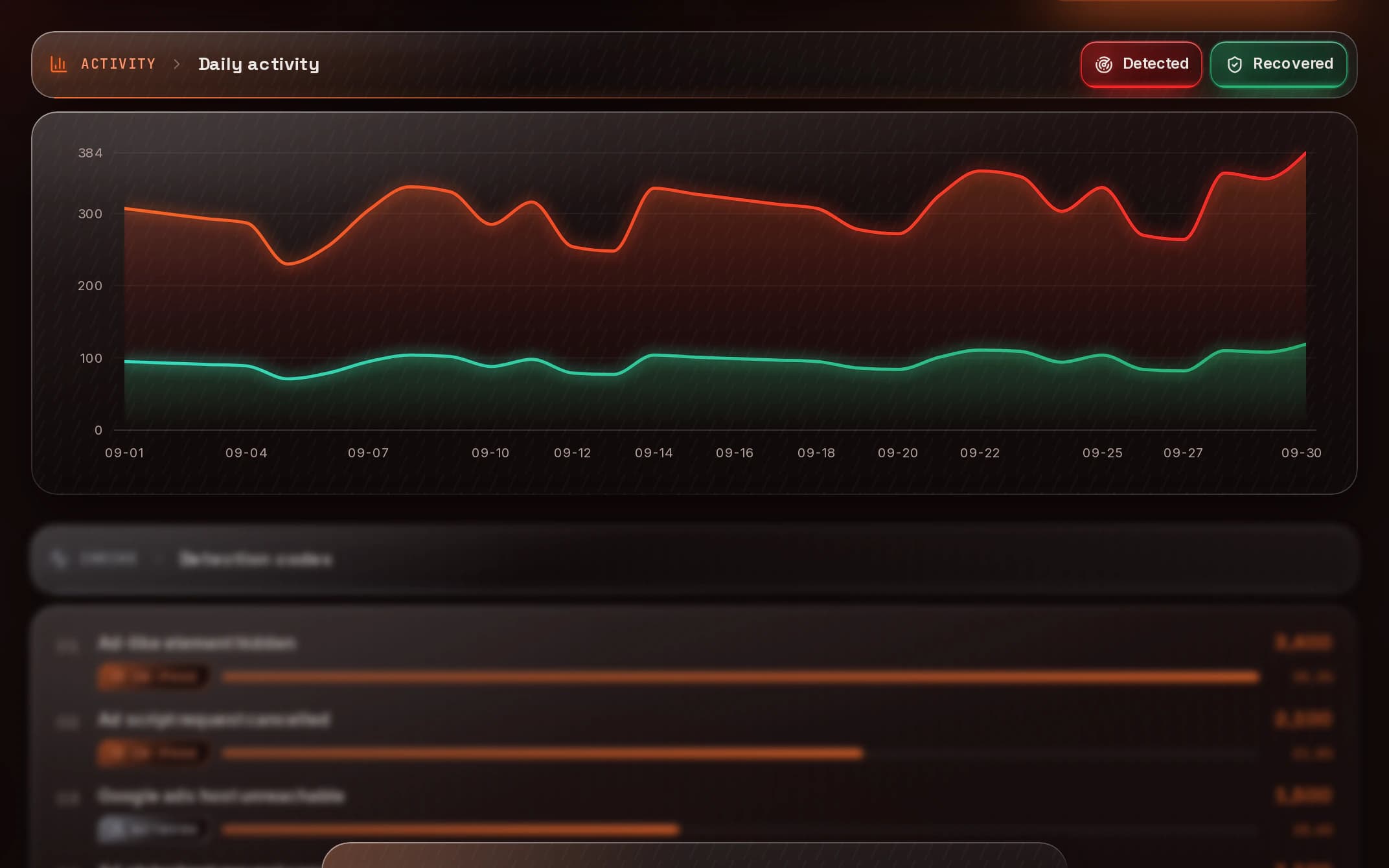
Per-site dashboards: detection rate, recovery rate and estimated revenue at your CPM. Breakdown by type of blocking for tuning.
Every plan gets the live overview: detections, recoveries, recovery rate and estimated revenue at your CPM. Max and Business add the breakdown by type of blocking, device, browser and country, daily trends and the network-block split.
Add every site your plan allows, each with its own tag, settings and statistics. Each tag has an on and off switch in the dashboard: switched off, the script does nothing.
Sign up free, add your domain, get an instant verification token (meta tag or root file).
Install the official plugin and connect it from its settings: it verifies your domain for you.Add the CNAME record we give you: it also proves the domain is yours.Verify with a meta tag, a file or a TXT record.
Paste one async <script> tag in your <head>. It's domain-locked and tamper-proof, so no one else can use it.
Nothing to paste: the plugin adds the script to every page. With first-party, once your DNS record is active.Theme › Edit HTML: paste the tag before </head>.Paste the tag inside the <head> of your pages.In your theme, inside the <head> of theme.liquid.Site settings › Custom code › Head code.In your root layout, inside <head>.
Every visit is silently scanned. Readers with an ad blocker see a notice with your brand that asks them to allow ads to keep reading. You see the impact in real time.
Served from your own domain: maximum detection, on every plan.Served from antiadblockcore.com: the quickest start, no DNS change.
Step 1 · WordPress · first-party
<meta name="antiadblockcore-verification"
      content="YOUR-TOKEN">
<script async
  src="https://antiadblockcore.com/s/SITE_ID.js"
  data-aabc-site="SITE_ID"
  crossorigin="anonymous"></script>
Example figures.
Your script, generated per site
On WordPress, the official plugin connects your site from its settings and adds the script to every page for you. On Blogger you paste the tag into your theme HTML before </head>. And it works the same on Shopify, Webflow, Ghost, Next.js or plain HTML: on any website where you can add a script tag. Your ads keep coming from AdSense, Google Ad Manager, Mediavine, Ezoic or any other network.
Maximum detection
Served from a subdomain of your own domain. Maximum detection. One CNAME record that also verifies the domain; we issue and renew the certificate. Every plan.
The quickest start
Served from antiadblockcore.com. The quickest start: no DNS change, only the tag and a domain verification with a meta tag, a file or a TXT record. Filter lists keep adding rules against third-party detection scripts, so detection can drop over time; you can move to first-party at any time.
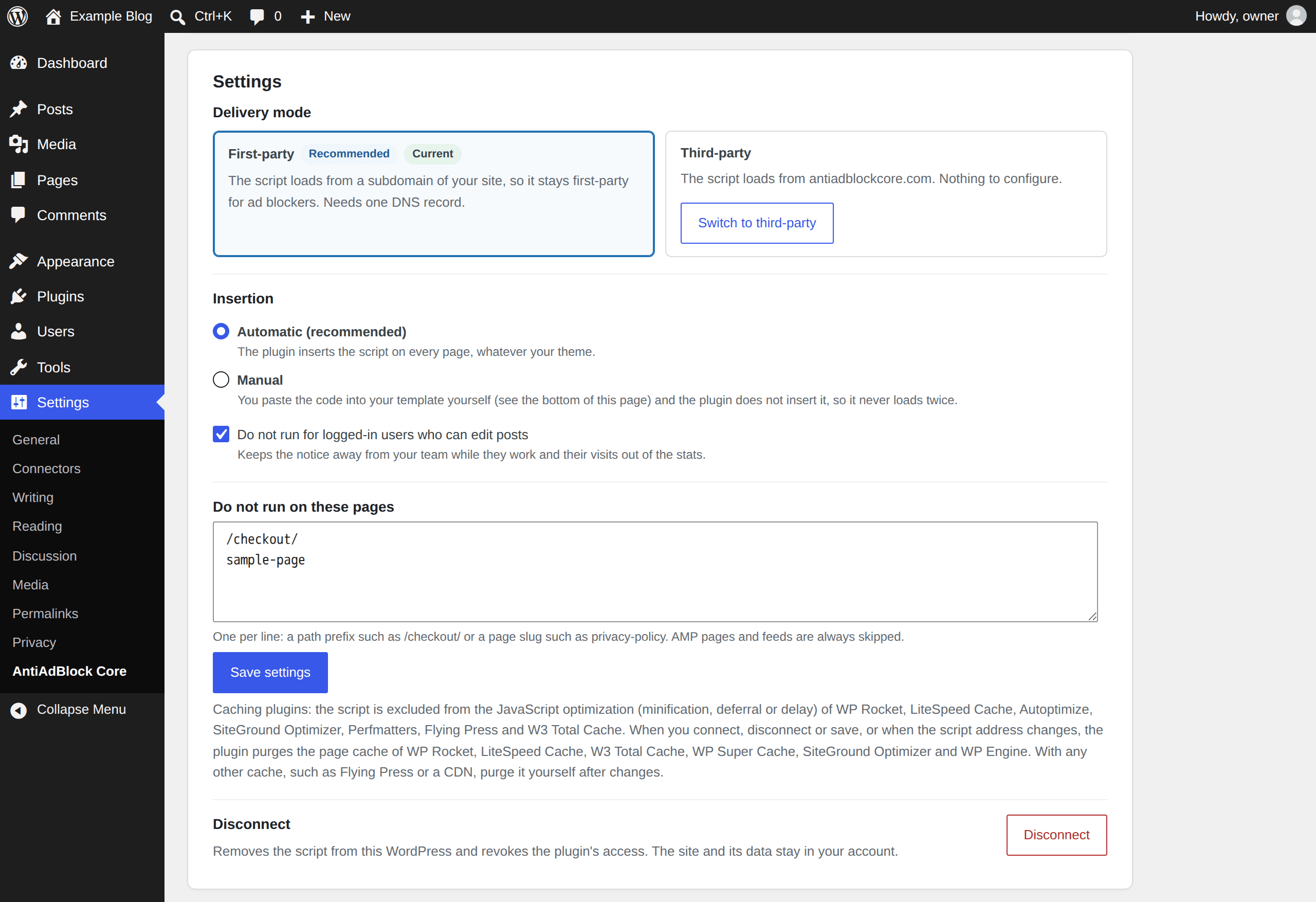
The plugin verifies your domain and adds the script to every page, whatever your theme; with first-party delivery, as soon as your DNS record is active. It works with WP Rocket, LiteSpeed Cache, Autoptimize and other caching plugins, and skips logged-in users who can edit posts.
Anti adblock plugin for WordPressLooking at adblock recovery software? See how a flat-priced script compares with revenue-share platforms.
All plans include the same detection engine. Limits are on volume, not on quality.
For solo creators kicking the tires.
For growing creators and small publishers.
For serious publishers with real traffic.
Everything included. Built for high-traffic publishers.
From $0.01 per 1,000 detections ($10 per million), with no monthly cap and unlimited websites. It's for high-volume sites and agencies: write to us with your numbers and we'll set it up.
$10per millionno monthly capunlimited websitesYour plan usage is metered by adblock detections, and by nothing else.
Example: with 20 to 30% of visitors blocking ads, the 5,000 detections of the Free plan cover between 16,000 and 25,000 page views a month.
One detection = one page view where we detect an adblocker.
Your monthly limit is your plan's number of detections.
You're never charged for page requests, with or without an adblocker. Only detections count.
Publishers lose around 30% of their ad revenue to ad blockers. Move the sliders to see what AntiAdBlock Core would put back in your pocket.
You're losing / month$336
You're losing / year$4,032
You'd recover / month$336
The estimate assumes blocked page views come back once the visitor allows ads, at your CPM. Your dashboard shows your own figures once the script is live.
Claim my recovered revenueYour plan, from your figures detections = page views x ad blocker rate
With about 140,000 detections a month the Max plan fits you: 1.5M detections for $12.99 a month.See plans
AntiAdBlock Core works for any site that monetizes with display, programmatic, pop ads, affiliate, video ads, push ads and more. Recover your earnings from any ad format.
Recover ad revenue from readers who bounce paywalls. A notice with your brand asks readers with an ad blocker to allow ads to keep reading.
Solo creators using AdSense, Mediavine or Ezoic stop losing 25–40% of impressions to adblockers. One script, real money back.
uBlock Origin is everywhere in gaming verticals. Our multi-signal ensemble catches every Optimal/Complete uBO variant by design.
Pre-roll and mid-roll blocking is the #1 revenue leak for VOD. We detect adblock before the player loads and serve a recovery flow.
Tech-savvy users mean adblock rates of 25–40%. Lock the script to your domain, prevent abuse, and recover even from power users.
Affiliate networks block when adblockers strip referral links. We detect, alert, and surface a one-click whitelist call-to-action.
AntiAdBlock Core is an anti adblock script and adblock recovery tool for publishers: it detects visitors who use an ad blocker and asks them to allow ads on your site. It is built by a team of developers who were also publishers, tired of losing revenue to silent blocking.
About us99.7% precision is the figure we publish for the detection engine. The free plan lets you check it on your own traffic before paying anything.
Start freeAround 30% of ad revenue lost to blockers: see the adblock statistics we cite.
Adblock statisticsNo tracking cookies, no fingerprinting, no visitor identifiers: daily totals per site.
Privacy policyOfficial plugin listed on WordPress.org.
AntiAdBlockCore on WordPress.orgA first reply to every ticket in under 24 hours, every day of the week.
Contact usAn anti adblock script detects when a visitor has an ad blocker active (uBlock Origin, AdBlock Plus, AdGuard, Brave Shields, Ghostery and others) and gives you, the publisher, a way to recover the ad revenue you lose, usually by asking the visitor to allow ads on your site (to whitelist it). Blocking and consent rejection together cost a typical publisher around 30% of potential ad revenue. When a visitor with an ad blocker allows ads, your usual ads load and your ad network pays for those impressions again. See it in the live demo.
Create a free account, add your site and paste one async script tag into your <head>. By default the script is served from a subdomain of your own domain for maximum detection, set up with one DNS record that also verifies your site. Prefer not to touch DNS? Load it from our domain and verify with a meta tag, a file or a TXT record. Pasting the tag takes about a minute; the DNS record usually goes live within minutes, sometimes up to an hour. See the setup step by step.
Yes. On WordPress, the free official AntiAdBlock Core WordPress plugin connects your site from its settings: it verifies your domain and adds the script to every page with no code to paste (with first-party delivery, once your DNS record is active). On Blogger you add the anti adblock script by pasting the tag into your theme HTML, before </head>. It also runs on Shopify, Webflow, Ghost, Next.js and plain HTML: any website where you can add a script tag (AMP pages are not supported). Thousands of websites across 40+ countries already run it.
Yes. AntiAdBlock Core detects uBlock Origin and uBlock Origin Lite (Basic, Optimal and Complete modes on Chrome's Manifest V3), AdBlock, AdBlock Plus, AdGuard, Ghostery and Brave Shields, on desktop and mobile, in every major browser. Blocking that happens at network level, with Pi-hole, AdGuard DNS or NextDNS, is detected as well and reported apart in your dashboard. More on our adblock detector.
Both. In Recovery mode, the default, visitors with an ad blocker see a notice asking them to allow ads on your site, and it works as an adblock wall: they have to turn the blocker off for your site to keep reading. Visitors blocked only at network level can be allowed to close it. Readers without an ad blocker never see it. Pro adds your accent color and backdrop; Max, your logo and your own message. More on ad revenue recovery.
Yes, with the adblock detection API. In this mode AntiAdBlock Core runs the same detection but shows nothing: the result is handed to your own JavaScript through an event or a callback, and your code decides what happens next, such as your own notice, a registration wall or a different offer. It is set per site, comes with the Max and Business plans, and detections count exactly as they do in Recovery mode.
Yes. We keep detection current as ad blockers and their filter lists change, with nothing for you to update. Filter lists keep adding rules against third-party detection scripts, so the setup we recommend is first-party delivery: the script is served from a subdomain of your own domain, which gives you maximum detection. It takes one DNS record, we issue and renew the certificate, and it is included in every plan, the free one too. See how first-party delivery works.
No law we found bans detecting ad blockers as such; the rules regulate how the check is done. In the EU, the ePrivacy rules cover storing or reading information on the visitor's device and GDPR covers personal data, so how a script works matters. AntiAdBlock Core uses no fingerprinting, no tracking cookies and no visitor identifiers, and keeps only daily totals per site. It leaves a few timestamps with no identifier in the visitor's browser, for 30 days at most: list them in your cookie notice and check whether your consent tool should cover them. Our guide explains whether anti-adblock detection is legal.
Yes. AntiAdBlock Core never serves, reinserts or edits ads. It only asks visitors with an ad blocker to allow ads on your site, and once they do, your existing tags from AdSense, Google Ad Manager, Mediavine, Ezoic or any other network load normally. Asking visitors to allow ads is an accepted practice: Google AdSense has its own ad blocking recovery messages that ask for the same thing. What you must never do is trick visitors or force ad clicks, and the notice does neither.
No. The AntiAdBlock Core script loads asynchronously with no dependencies, so it is never a render-blocking resource, and if our servers ever fail to respond it simply does nothing. For SEO, your content stays in the page as always, and search engine crawlers do not use ad blockers, so they never see the notice and index your pages as before. Only visitors with a confirmed ad blocker see it, and you can switch it off per site from your dashboard at any time.
Yes, there is a free plan: 5,000 detections a month for one site, with no payment details and no time limit. Plans are counted in detections: a detection is a page view where an ad blocker is detected, and page views without one never count. If you reach your limit, detection pauses until your next cycle and your site keeps working as usual. Paid plans start at $5 a month, with public flat pricing and no revenue share. See plans and pricing.
What your blocked visitors were costing you: once a visitor allows ads, your usual ads load and your ad network pays you as for any other impression. The adblock revenue calculator lets you model it with your own page views, CPM and ad-block rate, and once the script is live your dashboard shows the real numbers: detections, recoveries and the estimated revenue recovered at your CPM. You can start measuring on the free plan before paying anything.
AntiAdBlock Core is a self-serve script with flat public pricing, while platforms such as Admiral and Blockthrough charge a share of the ad revenue they recover for you. Ours works on top of any ad network and you keep 100% of what you recover. A free copy-paste script is rarely maintained, so it tends to stop detecting as ad blockers update; ours is kept current for you. Compare the anti-adblock alternatives.
With Blocklist Watch. Every day we read the filter lists ad blockers download and the public trackers where their maintainers work; anything that names one of your domains appears in your dashboard in plain language, from the Pro plan. On Max and Business you can send the case to our team with one click and we tune detection for your site.
Free forever for the first 5k detections / month. No credit card, no spam, no dark patterns.
What you tried in the lab
AntiAdBlock Core · 5,000 detections / mo, free forever.
Start free