WordPress plugin
AntiAdBlockCore – AdBlock Recovery
Recover the ad revenue ad blockers take from your WordPress site
Recover lost ad revenue by detecting ad blockers and showing customizable anti-adblock messages on your WordPress site.
Connect your site in one click: the plugin verifies your domain and loads the script on every page, whatever your theme. No code to paste.
Or search for AntiAdBlockCore in Plugins › Add New. Prefer a file? Download the .zip
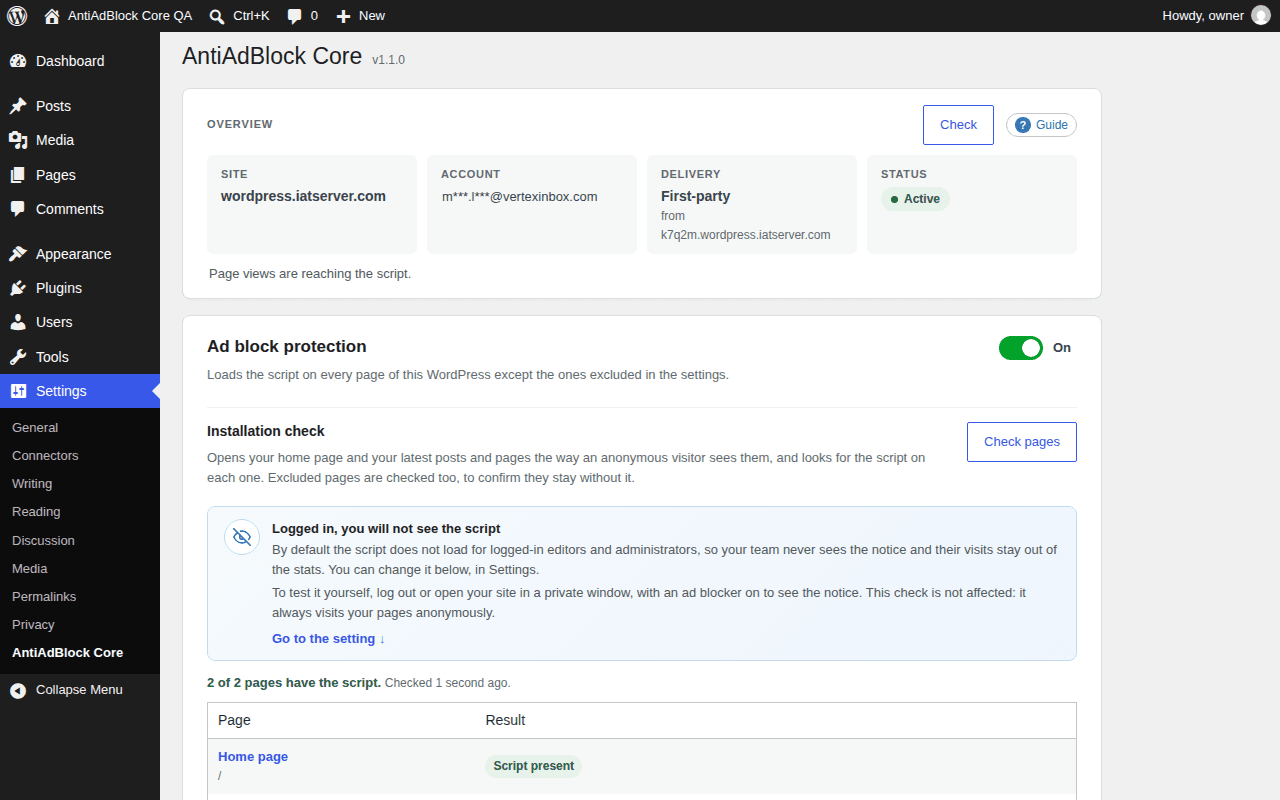
Overview, protection switch and installation check.
Live in three steps
No developer, no theme editing, no tag manager.
- 1
Install and activate
Upload the plugin to your WordPress and activate it. You will find it under Settings › AntiAdBlock Core.
- 2
Connect your account
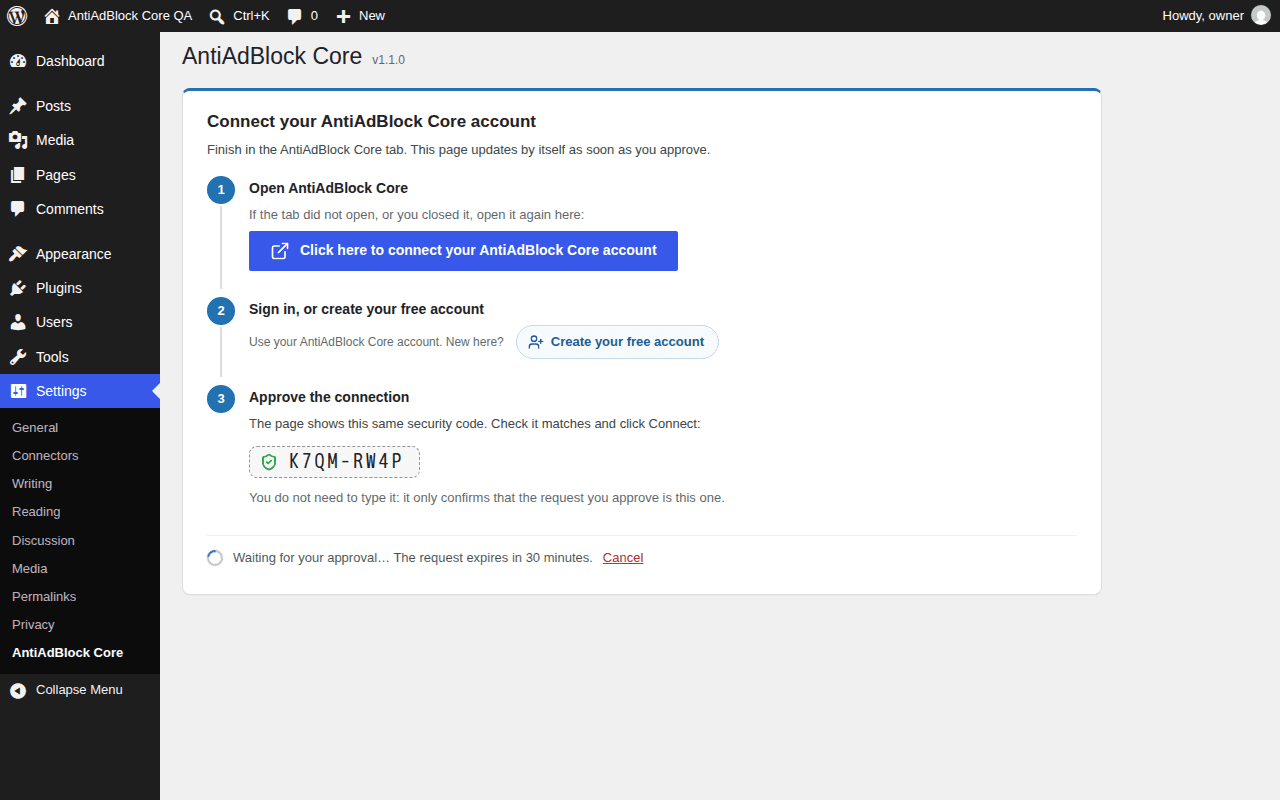
Click “Click here to connect your AntiAdBlock Core account”. Sign in, or create a free account, check that the security code matches and approve.
- 3
The script goes live
The plugin verifies your domain and loads the script on every page, whatever your theme. Customize the notice and read the stats in your dashboard.
Everything you need, inside WordPress
A settings page organised in sections, so you always know where your site stands and what is missing.
Overview at a glance
Site, account, delivery mode and status side by side, with a Check button that reads everything again when you need it.
First-party delivery
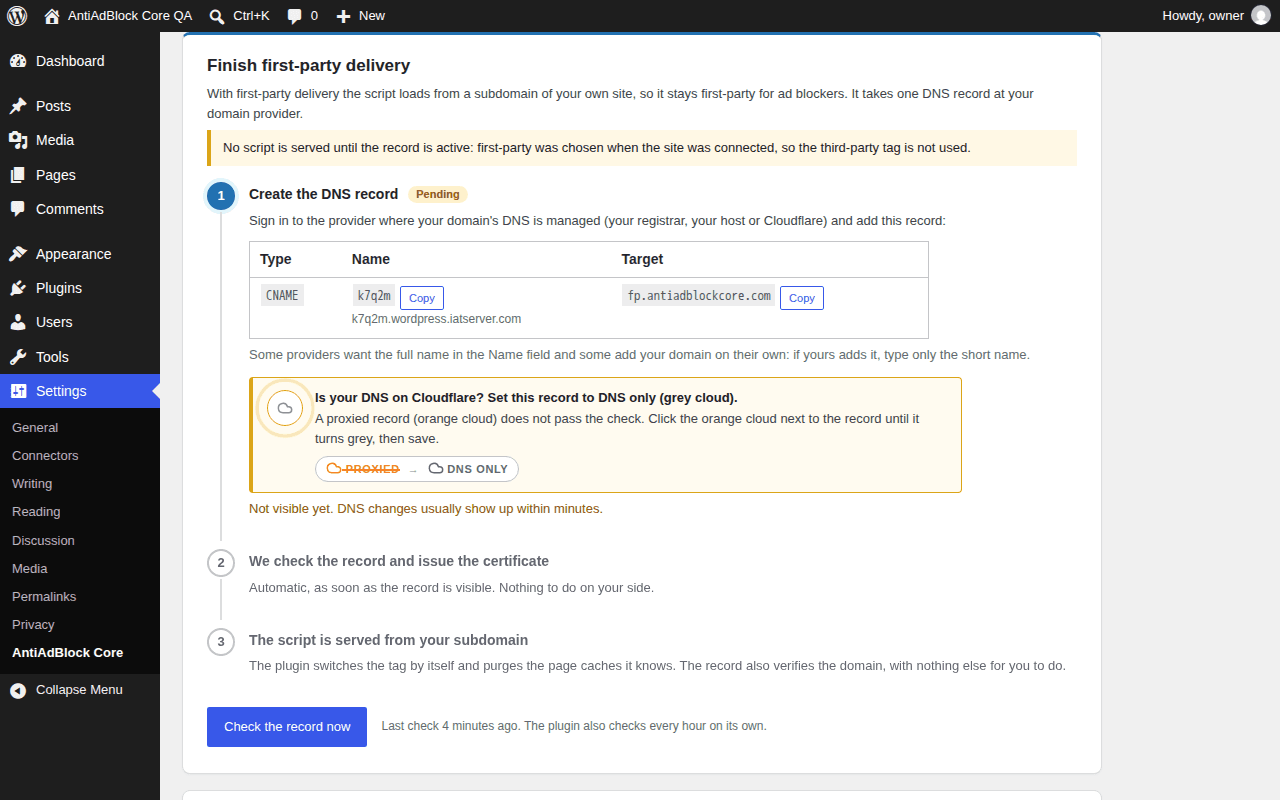
Serve the script from a subdomain of your own site with one DNS record. Numbered steps show exactly what is missing, including the Cloudflare “DNS only” setting. Third-party is one click away, and you can switch at any time.
Protection switch
Turn protection off and on from WordPress. The site stays connected and your settings are kept.
Installation check
Opens your home page and your latest posts and pages the way a visitor sees them and confirms the script is on each one, and that excluded pages stay without it.
Any theme, any cache
Works with themes that skip wp_head() and with WP Rocket, LiteSpeed Cache, Autoptimize, SiteGround Optimizer, Perfmatters, Flying Press and W3 Total Cache. Page caches are purged when something changes.
Exclusions and your team
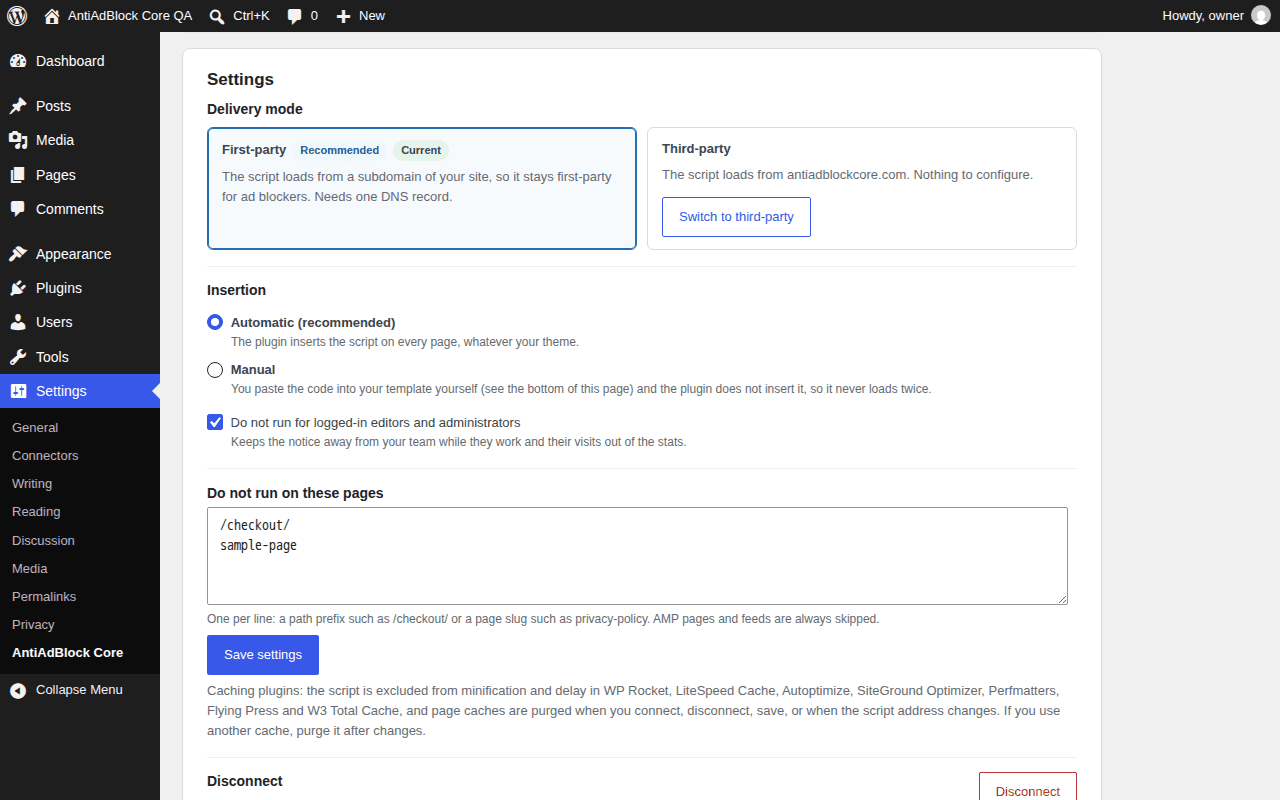
Exclude pages by path or slug. Logged-in editors and administrators are skipped by default, so your team never sees the notice and their visits stay out of the stats.
Manual code when you need it
Headless front end or a builder that serves its own HTML? Get the exact code for your delivery mode and switch insertion to manual.
Customize and measure
Style the notice, choose how firm it is and follow detections, recoveries and pages per site in your AntiAdBlock Core dashboard.
See it in your WordPress admin
What the plugin sends, and when
- Nothing is sent until you click connect.
- When you connect: your site address and name, the WordPress, PHP and plugin versions, your admin language and whether the site is a multisite, a subfolder install or a non-production environment. No user accounts, emails or content of your site.
- Afterwards the plugin reads your site's status once an hour, so the script address and your quota stay current.
- On your pages, the script reports for each page view whether an ad blocker was detected and which kind, the page path, the browser type and the country derived from the IP address. It keeps only a small first-party entry in the visitor's browser (a timestamp flag with no identifier, for 30 days) and does not track visitors across sites.
Start free, upgrade when it pays for itself
The free plan includes 10,000 ad blocker detections per month for one site, with no card and no time limit. Paid plans start at $5/month and add detections, sites and notice customization. Plans are managed in your dashboard, never inside WordPress.
WordPress plugin FAQ
Do I need to paste any code?
No. The plugin inserts the script on every page, including themes that do not call wp_head(). If a headless front end or an external cache keeps it out, the settings page gives you the exact code for your delivery mode and lets you switch insertion to manual.
Does it work with my theme and caching plugin?
Yes. The script is excluded from minification and delay in WP Rocket, LiteSpeed Cache, Autoptimize, SiteGround Optimizer, Perfmatters, Flying Press and W3 Total Cache, and page caches are purged when you connect, save settings or when the script address changes. AMP pages and feeds are skipped automatically.
First-party or third-party delivery?
First-party loads the script from a subdomain of your own site and needs one CNAME record at your domain provider; the plugin guides you step by step and the certificate is issued for you. Third-party loads it from antiadblockcore.com with nothing to configure. You can switch from the plugin at any time; when a site already running third-party moves to first-party, the third-party tag keeps working until the record is active.
What data does the plugin send?
Nothing until you connect. Then your site address and name, the WordPress, PHP and plugin versions, your admin language and basic install details (multisite, subfolder, environment), and afterwards an hourly read of the site status. The script on your pages keeps only a small first-party entry in the visitor's browser (a timestamp flag with no identifier, for 30 days) and does not track visitors across sites.
Why don't I see the notice while I'm logged in?
By default the script does not load for logged-in editors and administrators. To test it, log out or open your site in a private window with an ad blocker on. You can change that setting, and the installation check always visits your pages anonymously.
What happens if my plan has no room for another site?
Both the approval page and the plugin tell you that you have reached the site limit of your account, with a link to upgrade your plan or manage your sites. The connection request stays valid for 30 minutes, so you can free a slot or upgrade and approve it.
Can I pause it or disconnect?
Yes. The protection switch stops the script on that WordPress while the site stays connected. Disconnect removes the script and revokes the plugin's access; the site and its data stay in your account.
Is it free?
The plugin is free and GPL-licensed. The service has a free plan with 10,000 detections per month for one site and no card required; paid plans start at $5/month.
Stop losing the visits ad blockers hide
Create your free account, install the plugin and connect your site in a couple of minutes.